
#3: iPython indents and command history broken
Solved!on January 21, 2009, 02:04 AM UTC — from  hannes ( 3,613 views )
hannes ( 3,613 views )
Pretty suddenly, ipython was acting weird. Auto-indentation after opening an if statement or loop stopped working. Command history (by pressing the up-arrow) yielded gibberish. Using Mac OS 10.5 and bash.
solution: sudo easy_install readline
-  yliu on December 20, 2009, 07:32 AM UTC
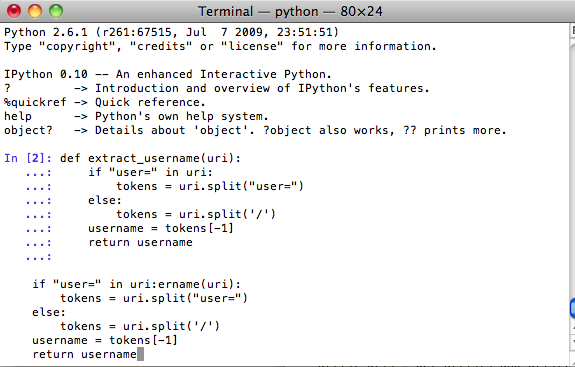
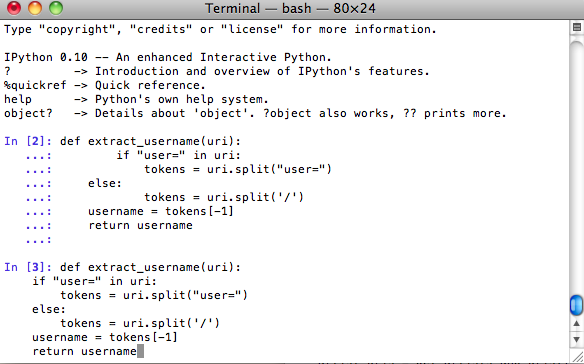
Ran into this problem again on OS X 10.6. iPython command history was scrambled, when you used up-arrow to go back. This is on Python 2.6.1 with iPython 0.10. You can see the problem in the attachments, and the fixed version after installing readline.
Simply run: sudo easy_install readline and all will be fixed.
Simply run: sudo easy_install readline and all will be fixed.
References used:
( http://ipython.scipy.org/moin/InstallationOSXLeopard ) - found by
hannes on January 21, 2009, 02:05 AM UTC
editline vs. readline
- hannes on January 21, 2009, 02:05 AM UTC
Seems that this was the problem: "Many of the problems users have experienced in IPython on OS X leopard are due to Apple's use of the BSD editline library instead of the GNU readline library in Leopard's system python. Ludwig Schwardt's has created an egg that statically links agains the GNU readline library. With this egg installed in /Library/Python/2.5/site-packages (or anywhere on the PYTHONPATH), the system python on OS X 10.5 is now pretty much the way to go. Dtrace support is a real advantage and setuptools mitigates the other issues described below. Many of the issues due to libedit have been fixed in recent versions of IPython. If you are using the latest IPython and are still experiencing issues due to readline vs. libedit incompatibilities, installing the readline egg (below) should fix things." from http://ipython.scipy.org/moin/InstallationOSXLeopard
References used:
( http://ipython.scipy.org/moin/InstallationOSXLeopard ) - found by
hannes on January 21, 2009, 02:05 AM UTC
Comments
Man, I posted this problem&solution a while back, and I forgot all about it. I ran into the same problem again on a new computer, and googled 'ipython broken' and this comes up as a first result. Perfect!
—