
#71: Dell Studio XPS wireless failure
Solved!on November 08, 2009, 07:41 AM UTC — from  yliu ( 15,424 views )
yliu ( 15,424 views )
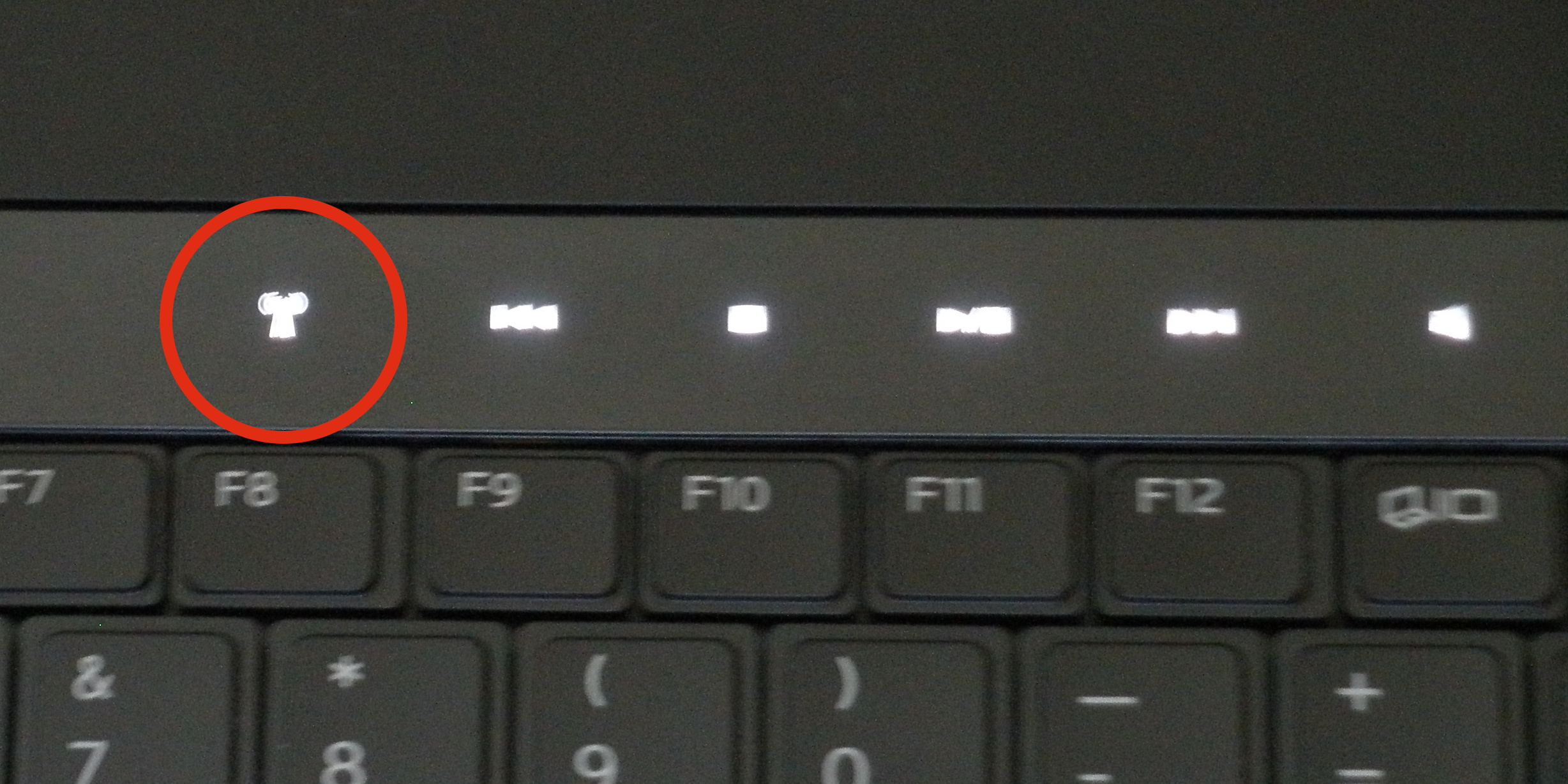
On the Dell Studio XPS laptop, the WiFi / wireless Internet mysteriously deactivates. All drivers report normal, and the trouble diagnostic reports that "wireless capability is turned off on this computer" and "Turn on wireless capability" to restore functionality. There is no obvious button or software switch to accomplish this.
There is a button that turns off wireless
- yliu on November 09, 2009, 12:00 AM UTC
The button that turns WiFi on and off looks like an indicator light. It is located at the top of the keyboard, above F8, along with a number of other "touch buttons" that look like indicator lights. See the blurry photo attached to this solution.
In fact, if you press a button, there is no apparent response (the light does brighten for a short bit), but it will turn on card back on.
You don't know how many times I mistakenly touch this stupid button and kick myself off the Internet. At least now I know why my network dies mysteriously.
Human-computer interface FAIL, Dell. Read some Don Norman, perhaps? You can't design a button that looks like a light and expect users to deal with it.
In fact, if you press a button, there is no apparent response (the light does brighten for a short bit), but it will turn on card back on.
You don't know how many times I mistakenly touch this stupid button and kick myself off the Internet. At least now I know why my network dies mysteriously.
Human-computer interface FAIL, Dell. Read some Don Norman, perhaps? You can't design a button that looks like a light and expect users to deal with it.
References used:
Studio XPS 1340 "Turn on wireless capability" - DELL COMMUNITY
( http://en.community.dell.com/forums/p/19266429/19477598.aspx ) - found by
yliu on November 08, 2009, 07:42 AM UTC
Think you've got a better solution? Help yliu out by posting your solution
Twitter / Nate Agrin: @yliu if it makes you feel ...
http://twitter.com/n8agrin/status/5527593093 - found by yliu on November 09, 2009, 12:02 AM UTC
I am not alone in having this problem. AARGH.
"wireless capability is turned off on this computer"
http://www.motherboardpoint.com/wireless-capability-turned-off-computer-t241456.html - found by yliu on November 08, 2009, 07:42 AM UTC
Studio XPS 1340 "Turn on wireless capability" - DELL COMMUNITY
http://en.community.dell.com/forums/p/19266429/19477598.aspx - found by yliu on November 08, 2009, 07:42 AM UTC
There is a "touch button", by which they mean an indicator light looking thing.
Comments
i actually find this one button annoying. Does anyone know of a way of disabling this one touch button?
— dev on March 22, 2010, 09:42 PM UTCThank you I was losing my mind looking for a switch!
— Emily wesemann on April 16, 2010, 02:28 PM UTCThe panel of those light up buttons frequently freeze on my computer. They do not respond during this time and my wireless is stuck in the off postition. How do I enable wireless without this button?
— Lindsay on June 02, 2010, 09:00 PM UTCThank you! I spent some too much time trying to use the F8 function key!!! Then I checked my router, etc. I had no idea I was supposed to touch the antenna light.....Do I feel dumb? Oh yea.
— Jim on August 09, 2010, 04:35 PM UTCu can disable the wirless button in the bios
— Ryan on August 30, 2011, 06:25 PM UTCThankyou... thankyou... thankyou!!!! Back on line
— Jane on November 19, 2013, 04:10 PM UTCi have a similar prob i switched on the button but tried updating driver, tried command prompt and device management but to avail..
— Tynash on July 29, 2018, 08:48 AM UTCThe airplane mode not turning off. and when i switch on the wifi its just not responding..turning on for a sec then off again